Stuck staring at your to-do list? Tunl Focus makes you decide, then do.
One task at a time, full screen. Every task gets an answer, so nothing sits rotting at the bottom of the list.
Done.Drop.Snooze.Defer.
Tunnel vision, on purpose.

No account. Nothing to sign up for.
Playing a demo.
Part of you wants the whole list. Part of you freezes at it.
The planner in you wants to see everything, sorted and under control. The part of you that actually does the work needs one thing in front of it, or it does nothing at all. Most to-do apps only make room for one of them.
Tunl Focus gives each its own space. The list, for arranging. The Tunnel, for doing.
One task, full screen.
The Tunnel shows you exactly one thing. No list, no sidebar, no forty other tasks competing for your attention.
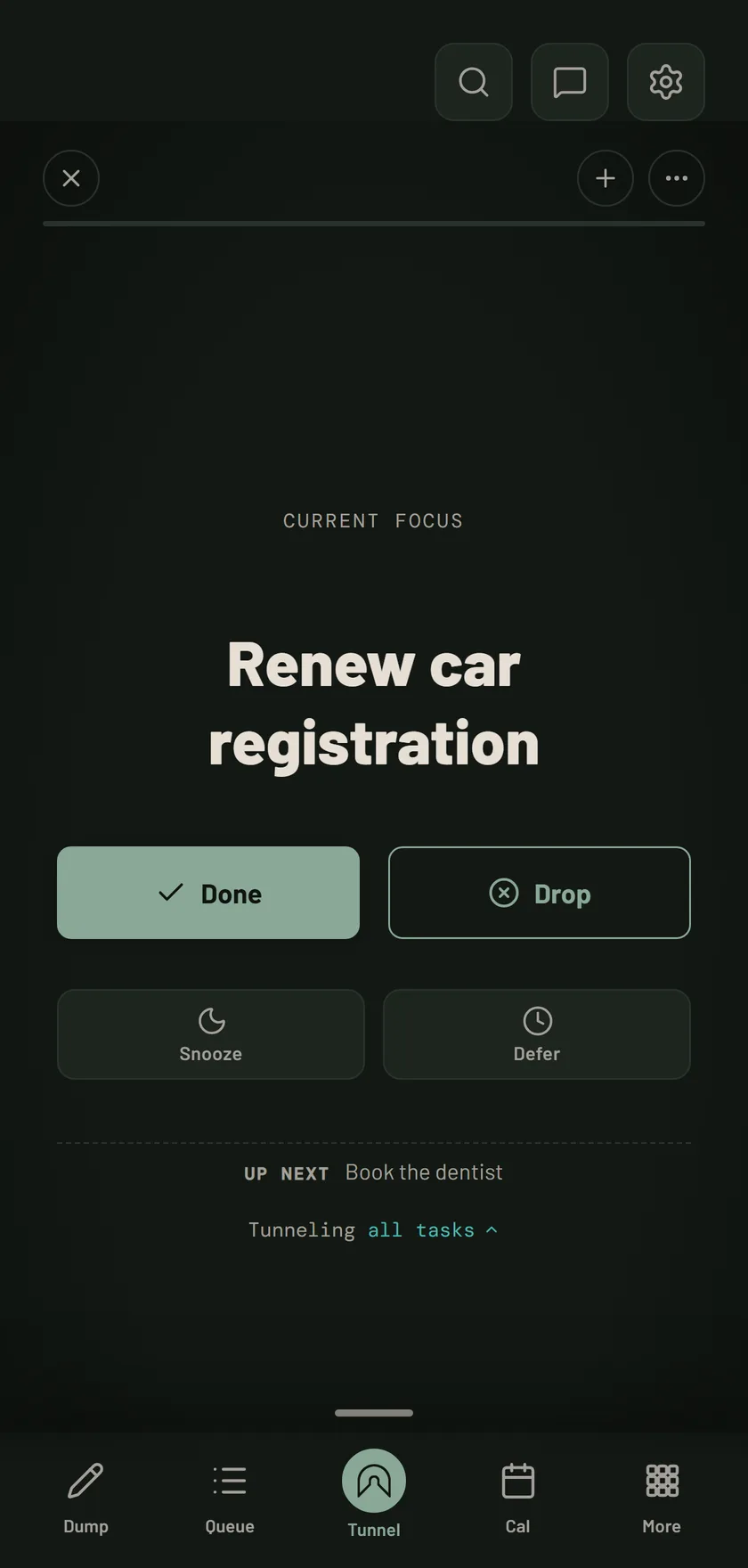
Every task gets an answer.
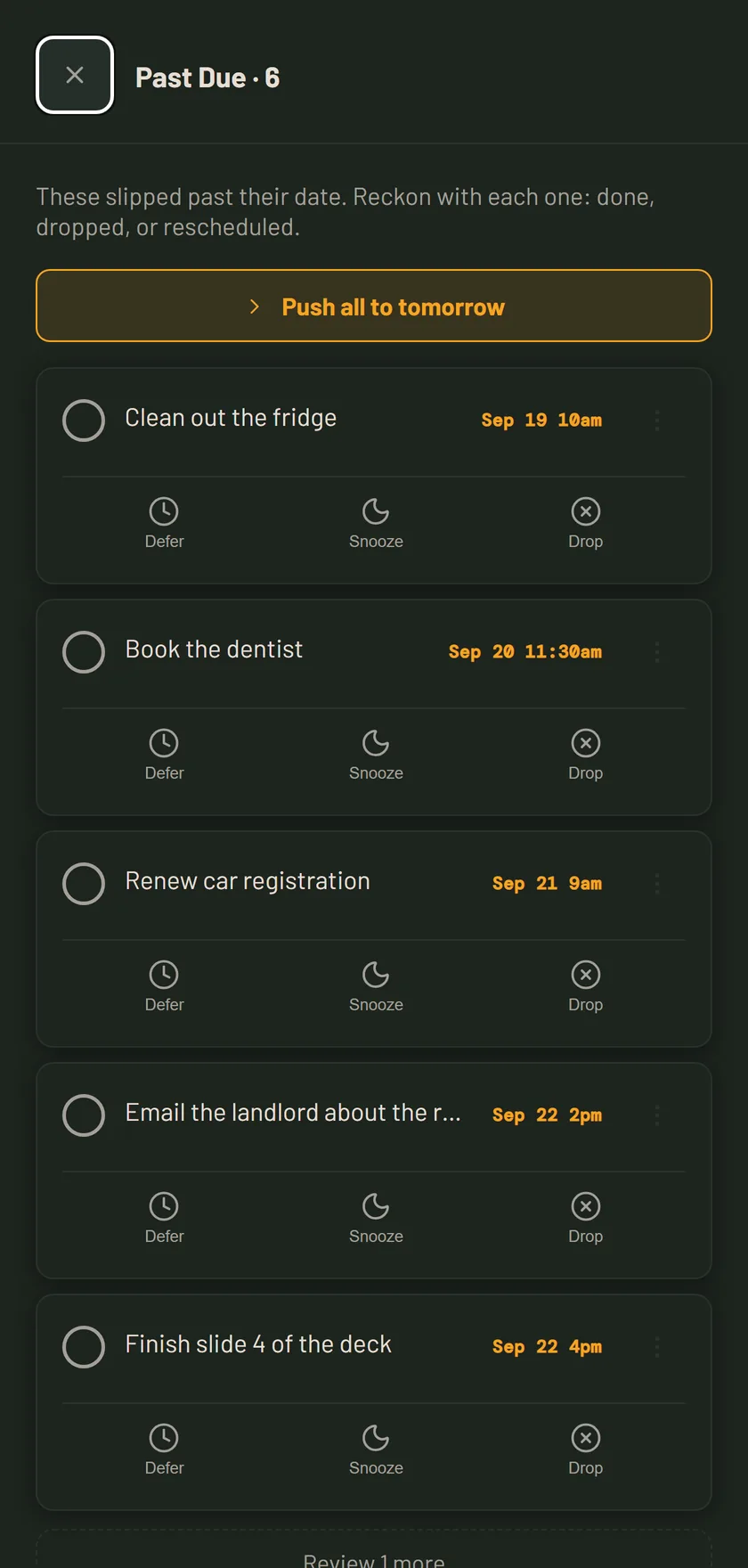
In the Tunnel, in the overdue pile, anywhere a task shows up, you have the same four choices.
Finished. Gone. On to the next one.
It doesn’t matter anymore. Let it go, no guilt.
Not now. Send it to the back of the line, or slot it exactly where you want it: next, fifth, thirtieth.
Not until a specific time. Pick a date and time, and it comes back when it’s due, either taking over your Tunnel or waiting right behind what you’re working on.
Nothing rots.
Overdue tasks do not quietly pile up at the bottom of a list you have stopped reading. They collect in one place, and when you open the app you clear them with the same four answers, in a few taps.
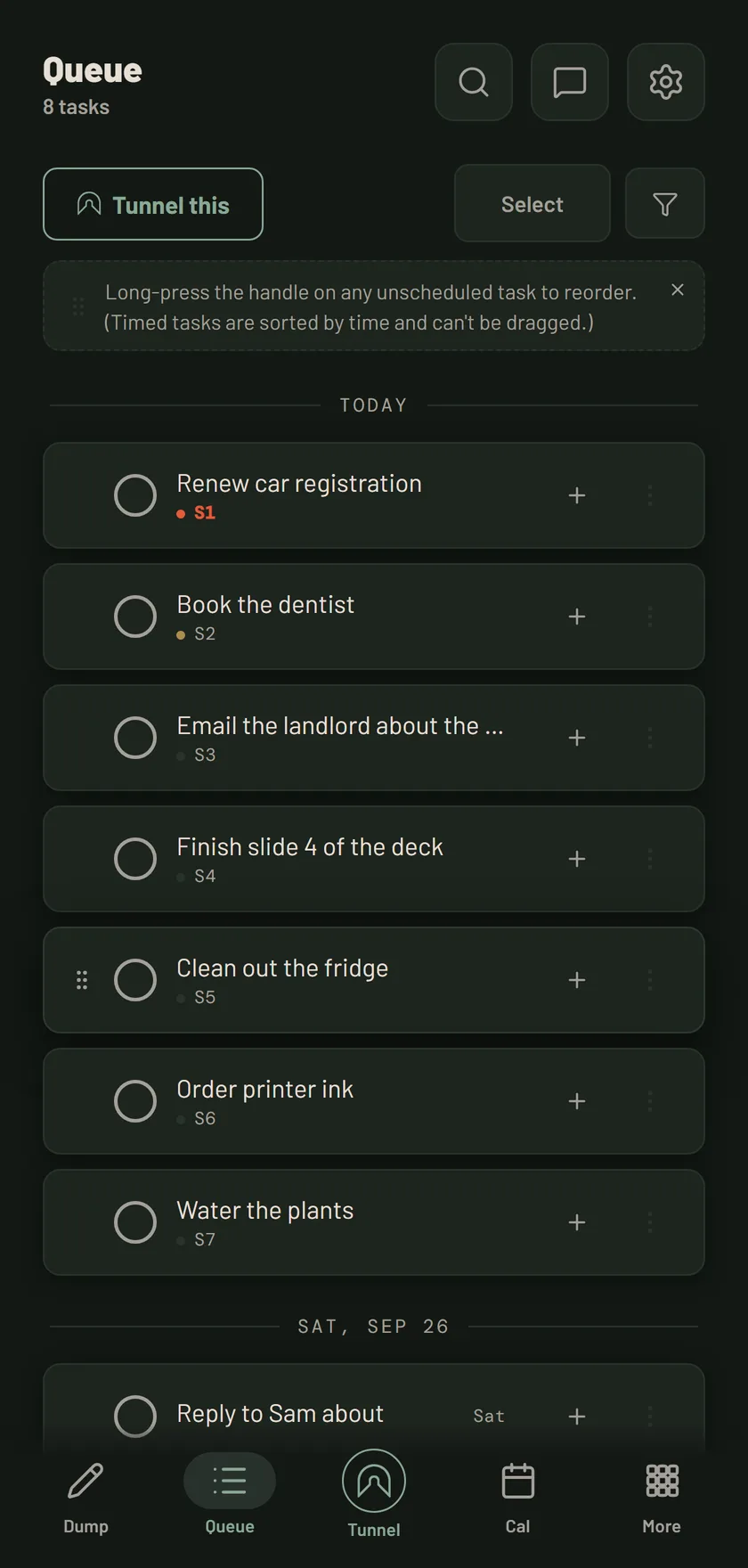
Line it up, or don't.
Some days you want the order exactly right before you start. Some days you want to dive straight in. Drag to reorder whenever you like: before the Tunnel, during it, or never.
Why Tunl Focus exists
There are two sides to me. One wants the big picture: every task on the table, sorted and planned. The one that actually gets things done freezes the moment it sees more than one thing.
For years I kept my tasks in a spreadsheet with a Sort column. I'd tell myself to focus on row 0, and only row 0. When it was done, row 1. When I got anxious I'd look over the whole list and reshuffle it until the order felt right, so I could go back to trusting the one thing on top. At work, at home, everywhere.
Tunl Focus is that spreadsheet, built properly. The list is there when I want the control of arranging everything. The Tunnel is there when I just need to be handed one thing, even if that thing is “drink some water” or “breathe”.
Jacob builds it. I live in it. Every rough edge in here is one I hit first, and most of what has changed since the first version changed because it did not survive contact with my actual week.
B, who uses it, and Jacob, who builds it
Find your way in
For ADHD
When every task feels equally loud, Tunl Focus puts just one on the screen.
More on Tunl Focus and ADHDTask paralysis
When you know what to do but cannot start, it hands you one task and four ways to answer it.
More on task paralysisOne task at a time
Single-tasking, built into how the app works instead of left to willpower.
More on single-taskingHow it is different from a regular to-do app
| Typical to-do app | Tunl Focus | |
|---|---|---|
| What you see | Your whole list, all the time | One task, full screen |
| Old tasks | Pile up until you stop looking | Every task gets an answer |
| Overdue items | A red badge you learn to ignore | Cleared in a few taps when you open the app |
| Getting started | Create an account first | No account, start in seconds |
Free to start. Pay only to sync.
Free
$0
- The Tunnel, all four answers, overdue clearing
- Reminders
- Works on your device, no account
- Light, dark and monochrome themes, with the Tunl green accent
Paid
$7.49 per month
or $75 a year, $6.25 a month, save 17%
- Everything in Free
- Sync across your devices, plus backup
- Google Calendar
- Six more accent colors, and early access to new features
Card required. Cancel anytime.
Questions
Is this just another to-do app?
No. Most to-do apps collect tasks and leave the hard part to you: deciding what to do with them. Tunl Focus shows you one task at a time and asks for an answer. Every task ends up done, dropped, snoozed, or deferred. Nothing just sits there.
What if I have a hundred tasks?
You still only see one at a time. The Tunnel works through your list in order, and you can arrange that order however you like, or not at all. A hundred tasks becomes one task, then the next.
Do I have to organize my list before I start?
No. Add your tasks and start the Tunnel right away, or spend time getting the order just right first. You can also reorder while you work. Whatever fits how your brain works that day.
What happens to tasks I snooze or defer?
Snoozed tasks move to wherever you slot them in line, the back by default. Deferred tasks disappear until their date and time, then return automatically. Depending on the task's settings, a deferred task either jumps straight into your Tunnel or waits behind your current task.
What platforms does it run on?
Tunl Focus runs in any browser. There is also a native Android app on Google Play.
What does it cost?
Tunl Focus is free to start, with no account required. Everything works on your device for free, including reminders. Syncing across devices, backup, Google Calendar, the full accent palette and early access to new features are part of the paid plan, which starts with a 30-day free trial. Light, dark and monochrome themes, and the Tunl green accent, are free.
Stay in the loop
Occasional updates, zero noise.
New features and the thinking behind how Tunl Focus is built. No spam, unsubscribe anytime.